curated • tested • trending

What Is Echo Glow and What Can It Do?
Discover the Amazon Echo Glow and how this smart lamp can transform your space. Learn about its core features and how it creates ambient lighting for any mood. Click to see its potential.
11/10/20259 min read
Have you ever wished you could change the mood of a room with just your voice? Maybe you want to create a calming, blue hue for a relaxing bath, a vibrant, rotating rainbow for a party, or a soft, warm glow for a bedtime story. Modern smart lighting can do this, but it often involves complex systems and high price tags.
Enter the Amazon Echo Glow. This deceptively simple smart lamp is designed to bring the magic of customizable lighting to anyone, without the hassle. But what exactly is it, and what can it really do for your home? This guide will demystify the Echo Glow, exploring its features and showing you how this little device can significantly transform your daily space and routines.
What Is the Amazon Echo Glow? A Simple Smart Lamp with Big Potential
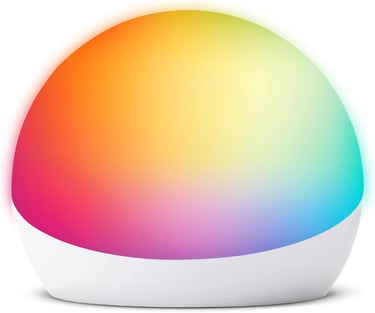
At its core, the Echo Glow is a compact, multi-colored smart lamp designed specifically for the Alexa ecosystem. Think of it less as a traditional light source for reading and more as an "ambiance engine."
Unlike a smart bulb that screws into a fixture, the Glow is a standalone, portable device that plugs into a wall outlet. Its soft, silicone dome houses a multi-color LED that can display millions of shades. It's designed to be incredibly user-friendly, offering control through your voice (via any Alexa device), the Alexa app on your phone, or a simple tap on its own surface.
Who Is the Echo Glow Really For?
This versatile little lamp has a surprisingly broad appeal:
Parents: It's a superstar for kids' rooms, functioning as a fun night light, a visual timer for "five more minutes of play," or a centerpiece for a calming bedtime routine.
Students & Tech Newcomers: It's an affordable and easy entry point into the world of smart home devices, allowing you to experiment with voice control and automation without a major investment.
Smart Home Enthusiasts: Even for those with more advanced setups, the Glow adds a unique, portable element of fun and can be integrated into larger Alexa Routines for things like "Movie Time" or "Party Mode."
Core Features and Capabilities: Unpacking the Echo Glow's Toolbox
The Echo Glow's true value lies in its blend of simplicity and powerful features. It's more than just a colored light; it's an interactive device designed to respond to your life. Let's break down its core capabilities.
Hands-Free Voice Control with Alexa
This is the Glow's primary and most convenient feature. Once set up, you can control it completely hands-free with any Amazon Echo device or the Alexa app.
Basic Commands: Simply say, "Alexa, turn on the Echo Glow," or "Alexa, set the Echo Glow to blue."
More Advanced Control: You can be more specific, using commands like:
"Alexa, set the Glow to 50% brightness."
"Alexa, make the Glow purple."
"Alexa, turn off the Glow in 30 minutes."
This seamless integration means you can adjust your lighting without lifting a finger—perfect for when your hands are full, you're cozy in bed, or you're across the room.
A Spectrum of Colors and Dynamic Effects
The Glow is not limited to a few preset colors. It can produce a vast spectrum of shades, allowing you to match your lighting to any activity or mood. Beyond static colors, its unique "Effects" are where the real fun begins.
Colors: Choose from millions of shades—from calming pastels to vibrant neons.
Effects:
Pulse: The light rhythmically fades in and out, creating a gentle, breathing effect perfect for relaxation.
Candle: It flickers softly, mimicking the warm, ambient glow of a real candle flame without the fire hazard.
Rainbow: The light smoothly cycles through a spectrum of colors, ideal for parties or playtime.
You can activate these with your voice: "Alexa, set the Glow to candle effect," or "Alexa, make the Glow pulse."
Simple Manual Touch Control
While voice control is fantastic, sometimes you just want to tap the device. A single tap on the top of the Echo Glow cycles it through a set of popular colors and effects. It's an intuitive and immediate way to change the mood, especially for children or when you don't want to use your voice.
Powerful Routines and Schedules
This is where the Echo Glow transforms from a novelty into a genuinely useful smart home tool. By integrating it into Alexa Routines, you can automate its behavior based on time, voice commands, or other triggers.
Practical Routine Examples:
"Good Morning" Routine: You can create a routine where saying, "Alexa, good morning" gradually brightens the Glow to a soft, warm yellow to mimic a sunrise, helping you wake up more naturally.
"Bedtime" Routine: A command like "Alexa, it's bedtime" could trigger the Glow to turn a calming blue and slowly dim over 15 minutes, signaling to a child that it's time to wind down.
Scheduled Lighting: You can schedule the Glow to turn on every weekday at 6:00 PM with a specific color, so you never come home to a dark room.
This automation capability is the key to making the Echo Glow a seamless and helpful part of your daily life.
Practical Uses and Scenarios: Transforming Your Home with the Echo Glow
Understanding features is one thing; knowing how to apply them is what creates a great experience. The Echo Glow's versatility shines in these everyday scenarios. Here's how you can use it to genuinely enhance your home life.
The Ultimate Wind-Down Assistant for Kids' Bedtime
For parents, the Echo Glow can be a game-changer. Instead of a battle, bedtime becomes a predictable, calming ritual.
How it works: Create an "Alexa Routine" triggered by a phrase like, "Alexa, start bedtime." This routine can dim the main lights and set the Glow to a soft, pulsing red or orange (colors that are less disruptive to melatonin production). After 10 minutes, it can automatically shift to a static, dim blue for sleep.
The Value: This visual countdown helps children understand the passage of time. The gradual dimming and calming colors signal their brains to wind down, making the transition to sleep smoother for everyone.
A Visual Timer for Focus and Play
The Glow provides a clear, non-verbal cue that everyone can understand, making it an excellent tool for time management.
How it works: Use a simple voice command: "Alexa, set a timer for 20 minutes on the Echo Glow." The light will glow for the duration and then turn off when the time is up.
The Value:
For Kids: "You can play until the light goes off." This makes abstract time concrete.
For Adults: Use it as a Pomodoro timer for focused work sessions. Set it for 25 minutes of work, and when the light turns off, it's time for a 5-minute break.
Instant Ambiance for Entertainment
Whether you're hosting a party or having a movie night, the Glow can set the stage in an instant.
How it works:
Movie Night: Create a routine called "Movie Time" that dims your other smart lights (if you have them) and sets the Glow to a dim red or purple, reducing glare on the screen and creating a theater-like atmosphere.
Party Mode: Use the Rainbow or Pulse effect to add a dynamic, colorful element to the room. You can even group multiple Glow lights to sync together for a bigger impact.
A Gentle, Sunrise Alarm
Waking up to a blaring alarm can be jarring. The Echo Glow offers a more natural alternative.
How it works: Set up a scheduled routine that triggers 15 minutes before your wake-up time. The Glow can start at 0% brightness in a warm, soft color and slowly, gradually brighten to full intensity, mimicking a sunrise.
The Value: This gentle light stimulation can help regulate your circadian rhythm, leading to a more refreshed and natural feeling upon waking.
Setting Up Your Echo Glow: A Stress-Free, Step-by-Step Guide
One of the Echo Glow's biggest advantages is its simplicity, starting with the setup process. If you can plug in a device and use a smartphone app, you can have your Glow up and running in just a few minutes. Here's exactly what to do.
What You'll Need Before You Start:
Your Echo Glow device and its power adapter.
A smartphone or tablet with the latest version of the Amazon Alexa app installed (available for iOS and Android).
An active Amazon account.
A working 2.4 GHz Wi-Fi network. (Important: The Echo Glow does not connect to 5 GHz networks).
The Setup Walkthrough:
Plug It In: Connect your Echo Glow to a power outlet. The light will initially pulse blue, indicating it's in setup mode and ready to be paired.
Open the Alexa App: Launch the Alexa app on your phone. Ensure you are logged into the Amazon account you use for your Alexa devices.
Navigate to Devices: Tap the "Devices" icon in the lower toolbar (it looks like a house with a light switch).
Add a New Device: Tap the "+" icon in the top-right corner and select "Add Device."
Select the Device Type:
Choose "Amazon Echo."
Then, select "Echo Glow."
Follow the In-App Instructions: The app will now guide you through the rest. It will ask you to confirm that your Glow's light is pulsing blue. It will then present a list of available Wi-Fi networks for you to choose from. Select your 2.4 GHz network and enter the password.
Wait for Connection: The app will now connect your Glow to your Wi-Fi network and register it to your account. This usually takes less than a minute. Once successful, the Glow will give you a visual confirmation, and it will appear in your list of devices within the Alexa app.
And you're done! Your Echo Glow is now ready to obey your voice commands and be part of your routines.
(Pro Tip: During setup, it's best to have your Glow plugged in relatively close to your Wi-Fi router to ensure a strong signal for the initial connection. You can move it to its final location afterward.)
Things to Consider: An Honest Look at the Echo Glow's Limits
To give you a fully transparent picture and ensure the Echo Glow is the right fit for your needs, it's important to discuss its limitations. A truly expert review doesn't just highlight the positives; it helps you make an informed decision by understanding the boundaries of a product.
It's an Ambient Light, not a Task Light
This is the most crucial distinction to understand. The Echo Glow is designed to cast a soft, diffuse glow to set a mood.
The Reality: Its light is not focused or bright enough for activities like reading, working on a desk, or illuminating a kitchen counter for food preparation. Think of it as a modern replacement for a decorative lamp or candle, not a functional desk lamp or overhead light.
The Alexa Ecosystem is a Requirement
The Glow's "smart" capabilities are entirely dependent on being connected to the Alexa ecosystem.
What This Means: To use voice commands or create routines, you must have either an Amazon Echo device (like an Echo Dot or Echo Show) or use the Alexa app on your phone. If you are invested in Google Assistant or Apple's HomeKit, the Echo Glow will not natively integrate with those systems.
The 2.4 GHz Wi-Fi Requirement
As mentioned in the setup, the device only connects to a 2.4 GHz Wi-Fi band.
Potential Hurdle: Many modern routers broadcast a dual-band network (2.4 GHz and 5 GHz) under the same name. If you have trouble connecting, you may need to temporarily separate the bands in your router's settings to ensure your phone and the Glow can see the 2.4 GHz network clearly during setup.
Limited Physical Control
While the tap-to-cycle feature is convenient, it offers limited options compared to the app or voice control.
For Example: You cannot adjust brightness or select a specific color shade with a tap. You are limited to the pre-set cycle of colors and effects. For precise control, you will need to use the Alexa app or your voice.
Final Verdict: Is the Echo Glow the Right Smart Light for You?
After exploring its features, uses, and limitations, the question remains: who should actually buy the Echo Glow? The answer isn't universal, but it's clear for specific users.
The Echo Glow is an excellent choice if:
You are a parent looking for a fun, effective tool to manage bedtime, create routines, or add a bit of magic to your child's room.
You are new to smart home devices and want an affordable, simple, and low-commitment way to experience voice-controlled lighting.
You are already invested in the Alexa ecosystem and want to add a versatile, portable ambiance light to your collection for parties, relaxation, or gentle alarms.
You appreciate the value of visual cues for time management and creating atmosphere without needing a bright, functional light source.
You might want to reconsider the Echo Glow if:
Your primary need is a practical light for reading, working, or tasks.
You do not use Amazon Alexa and have no intention of using the Alexa app or an Echo device.
You are looking for a primary light source for a room.
The Bottom Line
The Amazon Echo Glow is a deceptively simple device that excels in its specific niche. It is not a replacement for your existing lights but a powerful supplement for mood, routine, and fun. It transforms abstract concepts like "wind-down time" or "party mode" into tangible, visual experiences. Its greatest strength lies in its ability to make smart technology feel accessible, personal, and genuinely useful in everyday life.
If your goal is to easily add a layer of customizable ambiance to your home and simplify daily routines, the Echo Glow delivers on its promise in a uniquely engaging way.